

Ok, this is the usual boring “tools I use for writing” post which they tell me is a must on an author’s blog.
But then who knows, someone out there might find it interesting, or useful.
First thing first – the only piece of hardware you need to be able to write anywhere/anytime is a paper notebook (aka “the platform”) and a pen (aka “the input device”).
And please take notice – this is not some form of silly nostalgia thing, but a simple statement of fact: in the middle of the wilderness, with no energy grid and no hi-tech, good old pen-and-paper works.
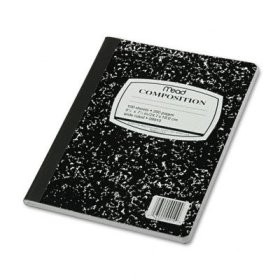 One has to spend some time to find the right notebooks and the right pen – because writing is also a phisical activity, and the tool must fit the hand.
But given some times, anyone can find his fave low-tech writing environment.
For me, it’s Mead Composition Notebooks and BIC black-ink pens.
But I’m developing a sort of fetish for the sort of rough, blank-pages hardbound notebooks you find at IKEA or other such places.
Incidentally, a notebook can be used for two good writing practices
. keeping a journal
. keeping a commonplace book, to use H.P. Lovecraft’s definition – a book in which you jot down ideas for future reference.
Moving on to computers and software, now…
I run on Linux.
It works for me, it’s free, solid, reliable.
I use Ubuntu on my home PC and Mint on my netbook.
I don’t seem to be able to embrace “writer’s software”.
I have friends that tell me marvels about Scrivener.
I’ve tried yWriter, Storybook and Writer’s Café – they are certainly great softwares.
The problem is me: graduating from typewriter to computer, I developed my likes and dislikes, my habits, my approach.
So, here’s how I go about it.
IF I do an outline (and sometimes I don’t, so sue me) I use GNote, a handy software that used to be called Tomboy.
It allows me to create a cloud of text files, linked to each other.
So I can outline my story, doing a scenes breakdown, then link a new note to the outline, one link for each scene, one new note for each scene, and also add linked notes about characters, places, situations.
 THEN, I do a first draft using a txt editor.
Gedit is my notepad of choice*.
It is to me much more distractionless than a distractionless word processor – old habits, as I said**.
I do research before and during the writing phase – using my personal library, but also using the web (Opera or Chromium web browser), and taking notes with a software called KeepNote which… well, keeps notes.
I keep a pdf reader handy as some informations can be found in pdf format online.
As English is not my first language (and I slip often), I use Artha as a thesaurus and dictionary, to check for words when I’m in trouble.
IF the first draft shows some promise, I move the file to LibreOffice Writer, where I save it as an odt file and then I do the the various edits, the final draft, and while I am at it, I format it.
LibreOffice Writer allows me to share the file with others – my editors and my early readers, if any – and share edits, notes and what not.
LibreOffice also allows me to save my finished work as a pdf or as an epub – for distribution as an ebook.
IF I go for the epub, I re-edit and check it out using Sigil.
IF I go for a mobi file, I use Calibre for the conversion.
IF I do my own cover – which I did a few times in the past, despite being graphically hopeless – I do it with the GIMP.
THEN I zip the lot, and archive a copy, and also upload a copy on a cloud server – I learned the hard way that file manuscripts are a fragile thing, and multiple backup copies are a necessity.
And this is almost it – I often write while listening to music, so a good media player is an essential piece of writing software to me.
I go for VLC or Rhythmbox.
Oh, and anyone interested in doing some journaling on a software instead of a notebook, may want to try RedNotebook, which is a fine piece of software indeed.
And this is it, I guess.
Of course, the best software is no guarantee that one will be able to write something worth reading.
But finding the right tools helps keeping the writing process as natural as possible.
I think.
———————————
* I’m using it to write this post, which I did not outline
** Again, as with writer’s software, I have nothing against distractionless word processors – I simply do not feel the need for them.

 Karavansara
30 January 2013 at 00:38
Thanks!
Maybe in one of your next posts you might tell us why you keep your options open about mobi and epub and how you choose from time to time between them.
LikeLike
30 January 2013 at 00:42
Good idea, Allsho.
I’ll have to write something about epub, moby and pdf…
Watch this space, as they say 🙂
LikeLike
Pingback: Paperback vs ebook « Under a poplar